
dsigns guides · Create content
Use ticker feeds and custom HTML
Connect public data and build a self-contained widget.

Start with a list and a fallback
Add a Ticker, choose Items from → List and enter one message per line. Set Speed. When switching to RSS/Atom or JSON URL, the text box becomes Fallback items. Keep useful messages there for times when fresh or usable cached data is unavailable. Choose Keep cached data: 1 hour, 24 hours or 7 days. This is the maximum acceptable data age, not a refresh interval.
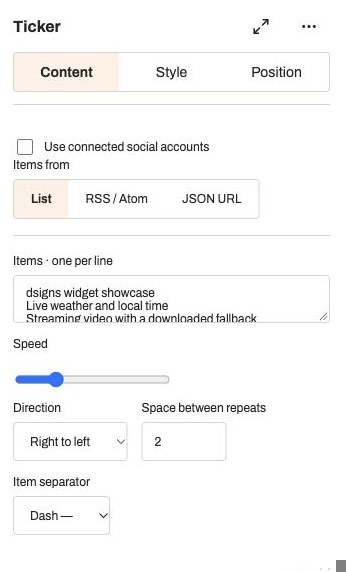
Actual app controlsThese example messages are typed into the test layout. RSS and JSON sources use the same widget. Connect RSS or Atom
Example: show headlines from your organisation’s public news feed. Choose RSS / Atom, enter the final public HTTPS feed URL and select Test feed. The ticker reads entry titles, removes markup and uses up to 100 non-empty items. A successful test reports the number found. Save the layout and publish the player when ready. Feeds are cached, so source edits may take time to appear.
Map JSON to ticker messages
Example: show today’s public event names or daily specials maintained in another system. Choose JSON URL. For this illustrative response, set Items path to
news.itemsand Text field totitle:{"news":{"items":[{"title":"Kitchen closes at 3 pm"},{"title":"Ask about today’s special"}]}}
Items path must point to an array. Dot-separated paths work for nested properties. Leave Items path empty for a root array; leave Text field empty for an array of plain strings. Select Test feed, correct the path if no items are found, and keep fallback text.Use an accessible feed
Use a public HTTPS hostname with a valid certificate and a response below 500 KB. Redirects, private/local addresses, custom ports and credentials in URLs are not supported. There is no authentication-header editor. Use the feed’s final address and never place private API keys in its URL or widget source. If testing fails, check the response format, array path and endpoint availability. A feed can keep showing cached data within the selected age before returning to fallback messages.
Build a custom HTML widget
Expand Advanced in Widgets, add Custom HTML, and paste the example below in its HTML box. Save the layout, then open Preview. The example is a starting point, not a customer integration. Use relative sizes and wrapping so the content fits when the region is resized. Bundle CSS and JavaScript in the source: externally loaded libraries, direct fetch calls, forms and native player APIs are unavailable.
<style>body{margin:0;padding:5%;background:#242624;color:#F5F0E7;font:clamp(18px,5vw,64px) sans-serif;overflow-wrap:anywhere}</style><p id="message">Welcome</p><script>document.getElementById("message").textContent="JavaScript is running";</script>Receive JSON in your HTML
Enter a public JSON data URL in the widget settings. The response is delivered to the frame in a window message with
{type:"dsigns:data", data, fetchedAt, stale}. Unlike a ticker, custom HTML receives the whole JSON value, without an Items path. For the illustrative response{"message":"Lunch starts at noon"}, replace the example script with:window.addEventListener("message", function(event) { const value = event.data; if (event.source !== parent || value?.type !== "dsigns:data") return; const text = value.data?.message; if (typeof text === "string") document.getElementById("message").textContent = text; });
Use textContent for feed text, validate the expected data shape and retain a useful initial message when no data arrives. The stale flag indicates cached data; fetchedAt is a timestamp in milliseconds. Custom HTML does not currently expose the ticker’s cache-age control.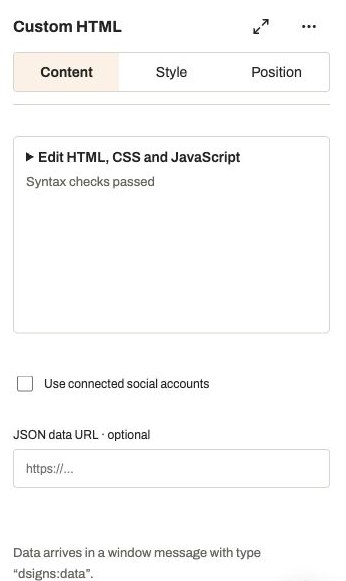
Actual app controlsEnter the public feed URL here. The saved widget receives its data through a window message. Test the saved result
Save after editing HTML because the frame uses saved source. Compare Preview with Open saved player preview. If the widget is blank, check the source, required element IDs, region dimensions and blocked remote dependencies. A URL that expects a login, external dashboard embed or device API is not equivalent to this self-contained widget. Test the intended player while connected and disconnected before leaving it unattended.