
dsigns guides · Create content
Build a custom screen application
Create a self-contained fullscreen experience with HTML, CSS, JavaScript and optional JSON data.
Start with an example
Copy a starter into Code, adapt it, then save and inspect Preview. These are examples, not customer content.
Reception & clock
A local clock and an entrance animation that respects reduced motion.
<style>body{margin:0;min-height:100vh;display:grid;place-content:center;background:#242624;color:#F5F0E7;font:clamp(24px,5vw,80px) sans-serif;text-align:center}h1{color:#F0642C}p{margin:.25em} @media(prefers-reduced-motion:no-preference){main{animation:appear 1s both}@keyframes appear{from{opacity:0;transform:translateY(16px)}to{opacity:1;transform:none}}}</style><main><h1>Welcome</h1><p>Example reception display</p><p id="clock"></p></main><script>function tick(){document.getElementById('clock').textContent=new Date().toLocaleTimeString([], {hour:'2-digit',minute:'2-digit'});}tick();setInterval(tick,1000);</script>Image & message
Replace the image placeholder with an image encoded as a data URI. Confirm it loads in Preview and on your player.
<style>body{margin:0;background:#242624;color:#F5F0E7;font:clamp(24px,4vw,72px) sans-serif}main{min-height:100vh;display:grid;place-content:center;text-align:center;padding:6vw;box-sizing:border-box}img{width:min(60vw,800px);max-height:60vh;object-fit:contain}h1{color:#F0642C}</style><main><img src="REPLACE_WITH_IMAGE_DATA_URI" alt="Describe your image"><h1>Your message here</h1></main>Connected data
Set a public JSON source in the Data tab. This example expects a message field and inserts it as text.
<style>body{margin:0;min-height:100vh;display:grid;place-content:center;background:#F5F0E7;color:#242624;font:clamp(24px,4vw,72px) sans-serif}main{padding:6vw}h1{color:#F0642C}</style><main><h1>Latest update</h1><p id="message">Waiting for connected data…</p></main><script>addEventListener('message',event=>{if(event.source!==parent||event.data?.type!=='dsigns:data')return;const value=event.data.data;document.getElementById('message').textContent=typeof value?.message==='string'?value.message:'No message available';});</script>| Can use | Keep outside the app |
|---|---|
| Inline HTML, CSS, JavaScript, SVG and canvas | Remote scripts, secret keys and direct API calls |
| Public JSON via the Data tab | Private endpoints or credential-bearing URLs |
| Connected accounts from the same customer | Another customer’s social accounts |
Create a Custom app
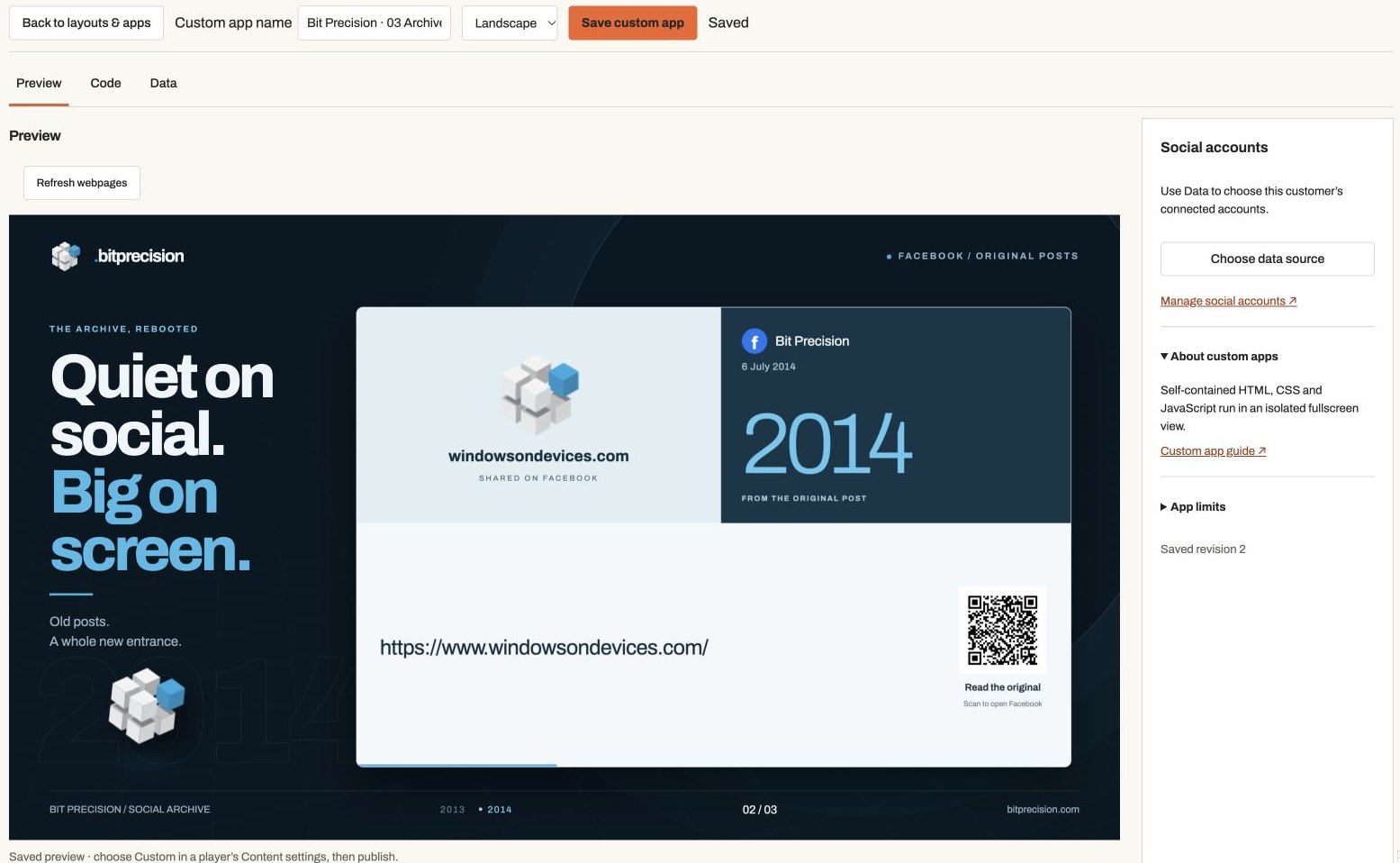
Open Layouts → New custom app, choose the customer and name, and start from the labelled example. The dedicated editor supports up to 100,000 characters and landscape or portrait dimensions. Use Preview to inspect the result, Code to edit it and Data to connect sources.
Actual app controlsAn actual Bit Precision example. Preview, Code and Data separate the presentation from its source and connections. Use the local building blocks
Use inline HTML, CSS and JavaScript, SVG, canvas, timers, animations, date/time formatting and images encoded as data URIs. Useful examples include animated information boards, welcome screens, counters and branded dashboards. Keep examples labelled; a demonstration is not live customer data. Include reduced-motion styles and readable fallbacks where appropriate.
Stay within the sandbox
The app is an isolated iframe with scripts enabled. Remote scripts, fonts, frames, forms, API requests, native device APIs and filesystem access are blocked. Connected social sources have a narrow exception for supported provider images and videos. Include code and styles in the document. No ZIP/WGT upload, package manager, secret storage, touchscreen kiosk controls or private/POS integration is supplied by this editor. Those integrations can be scoped separately when needed.
Receive public JSON data
Set the optional JSON data URL. dsigns retrieves bounded public HTTPS JSON without credentials and posts
{type: "dsigns:data", data, fetchedAt, stale}into the app. Listen formessage, check that event.source is parent and the message type is dsigns:data, validate the data shape and update text withtextContent. Do not insert untrusted strings withinnerHTML. Keep an initial offline display when no data has arrived.Use connected social posts
Enable Use connected social accounts in the HTML editor, choose accounts belonging to the selected customer and save. The optional social display starter generates editable HTML. Original posts, media and QR links arrive in the same data message. Social frames can load supported Meta image/video URLs; social data expires within one hour. Player capability 8 is required. Read the social guide for the data contract, MCP workflow and provider setup limits.
Understand caching and offline behaviour
The published HTML is included in the immutable layout and works from the local player cache. Self-contained animations and clocks can continue offline. Optional JSON uses the existing bounded feed cache; render a stale/unavailable state when appropriate and do not treat cached values as live. New code or data cannot arrive without connectivity.
Use the code feedback
The editor checks HTML structure and inline JavaScript syntax without executing your code. Select a diagnostic to jump to its line and column. A clean check does not prove the application works, that CSS is valid, or that performance is suitable for a low-cost player. Save to refresh the isolated preview and inspect behaviour.
Assign and publish
Save the app, then open a player’s Content settings and choose Custom. Select the app, save and publish. Custom owns the full screen; its HTML controls its internal layout. Use a Custom HTML widget inside Layout mode when the code only needs one card alongside native widgets.
Test scope before rollout
Check text scale, animation speed, resizing, data validation, an offline restart and a long run on the target player. Android/Fire TV use system WebView; desktop composition uses Edge/Chromium; BrightSign uses its compatible browser runtime. Platform versions, resources and hardware decoding differ. Keep a known-good saved app and publication available during trials.